Tampilkan postingan dengan label Place Pages for mobile. Tampilkan semua postingan

Kamis, 28 Oktober 2010

New in Google Maps for Android: Updated reviews, search filters, and Latitude real-time updating

Lately, we�ve been working on giving you even better ways to find nearby places with Google Maps for Android, such as the Places icon and rich Place pages. Today, we are launching Google Maps 4.6 with a new design for Place page reviews, more options to filter search results, and a Google Latitude real-time updating option.

Place page reviews
Now, you�ll see that Place pages on Android Maps share the same new design for displaying reviews as used by Place pages on your computer. You can see:
  • �Reviews from around the web� for highlighting sites that have high-quality reviews about the place.
  • �Reviews from Google users� for reviews posted directly to Google Maps by other users
Filter search results
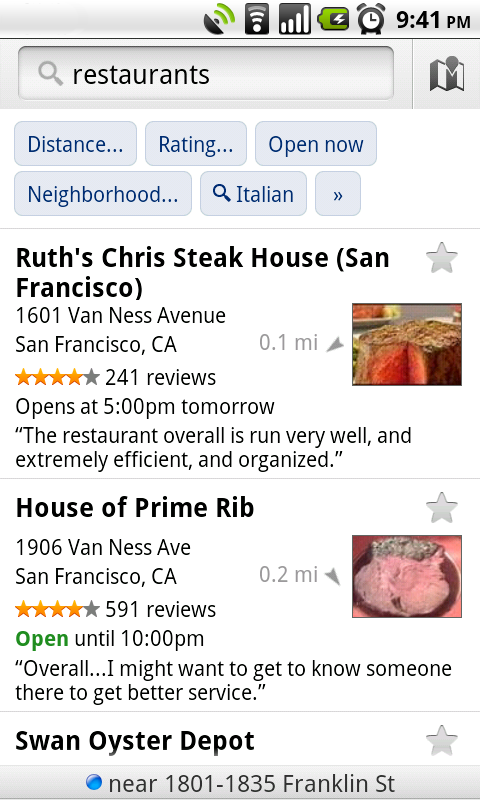
Of course, you�ll first need to narrow down which Place page reviews to check out. In addition to distance and ratings, you can also filter results for some searches by:
  • Open now
  • Neighborhood
  • Related searches

Find the right place with the updated reviews section (left) or search results filters (right).

Google Latitude real-time updating
In Latitude, you can also choose an experimental �Real-time updating� option from an individual Latitude friend�s profile page to help meet up with them by temporarily seeing faster location updates (friends must have Maps 4.6 and Android 2.2+).

Get Google Maps 4.6 for Android 1.6 and above everywhere Maps is already available. Just search for Google Maps in Android Market (or tap here from your phone).

Visit our Help Center to learn more or tell us your feedback and questions in our Help Forum.

Senin, 26 Juli 2010

An Even Better Way to Find Places Nearby

With six updates in six months, Google Maps for Android has been getting plenty of new features, both big and small. A continued focus with each update has been on giving you better ways to find places nearby. In the most recent updates, Maps has gotten features like swiping between search results and info like photos, reviews, and more helpful content on the result pages. With today�s launch of Google Maps for mobile 4.4, we�re introducing an even easier way to find places around you: a dedicated Places icon that lets you quickly look up nearby places and pick a place to go using updated Place Pages, just like on your computer.

On Android-powered phones with Google Maps 4.4, you�ll find the new Places icon in the app launcher with the rest of your apps. Press and drag it right onto your home screen to use it when you�re looking for a restaurant, shoe store, movie theater or any other type of local business. You'll get a detailed list of all the nearest places and can choose one to learn more about it on its Place Page.


Search for several convenient types of places with the default categories or add your own for your most frequent searches. You can also use the search bar at the top to type or speak any query. I tend to use the �coffee� search a lot, but I�ve also looked for �gas stations� on the road, �ice cream shops� in my neighborhood, and even specific places like �Chelsea Market� on a recent trip to New York.

Of course, you�ll often want to learn more before deciding where to go. With updated Place Pages, you should be able to find all you need to know about a place, whether you�re wandering into a new restaurant or deciding from your couch. In addition to photos and reviews, Place Pages now have a bunch of new details, such as prices, parking and menu links to inform your quest for the perfect steak. You'll also notice that the search results list now highlights business opening hours in addition to compass direction and distance -- consider it your late night caffeine radar.


Google Maps for mobile 4.4 is available now for Android 1.6 and above. Just search for Google Maps in Market or tap here from your phone. The Place Page and search result updates are coming soon for BlackBerry users so keep an eye out for an update at m.google.com/maps (from your BlackBerry Browser) or on our Twitter and Facebook pages.

Visit our Help Center to learn more, ask questions in our Help Forum, or give us suggestions and vote on other people�s on the Mobile Product Ideas page.

Update: Google Maps for BlackBerry version 4.4 is now available with the new search results view and Place Page details. From your BlackBerry's Browser, go to m.google.com/maps to install it now.

Selasa, 27 April 2010

New Place Pages for mobile

Last fall, we launched Place Pages which organize relevant and useful information about places on Google Maps. Since then we've been developing a version, available now, which gives you access to the same useful information optimized for your mobile phone. For example, in the video below, the Place Page for Mama's restaurant in San Francisco shows location information, customer ratings, opening hours and what people are saying about the restaurant in summary format.


To get more details on opening hours or on customer specific comments related to the food, service or ambiance, simply click on those respective sections to show more information instantly. The Place Page also provides links to useful websites where the user can read full reviews about the place. Lastly, if address and cross street information is not enough, click on the map button and you will be taken to a full screen dynamic map which is pannable and zoomable. In this way you can quickly see the restaurant's location in the context of the entire neighborhood.

To try this yourself, go to google.com on your phone's browser and search for "mama's sf". On the search results page, click on the listing for Mama's restaurant to go to the Place Page. This mobile optimized Place Page is currently supported on Android-powered devices and iPhones/iPod touches in the US.

Posting Lama ►
 

Copyright © 2012. Gadget Mania - All Rights Reserved B-Seo Versi 3 by Bamz