By Unknown | At 10.55 | Label :
Android
,
google latitude
,
google maps for mobile
,
transit
| 0 Comments
Hot off the presses, Google Maps for Android version 4.3 has added a couple new features to help you quickly choose the right place to grab dinner, catch the next train, and find friends to add in Latitude.
Have you ever had to make a split decision for dinner plans while on the go? Now, you can see a snapshot of what people are saying about places right on search result pages. Instead of poring through full reviews, you can start by looking at what the most frequently mentioned aspects about a place are, such as food, service, atmosphere, or anything else people keep mentioning. Just like on Place Pages for your computer, the color-coded bar gives an overview of how positively people are talking about any individual aspect. Tap one to see more details like the actual review snippets. Whether you�re looking for top-notch service or a vibrant ambiance, you can now pick just the right place to go.

You�ll also find a new addition to public transit station pages: upcoming schedules. Select any transit station icon directly from the map and open its page by tapping the window. You�ll find a handy list of the next departure times for any subways, trains, or buses that are leaving from that station where transit info is available.


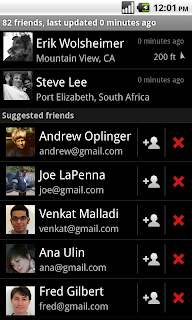
In Google Latitude, we wanted to make it even easier for you to find friends and family with whom you�d like to share your location. Right at the bottom of your Latitude friend list, you�ll be able to quickly start sharing your location with long lost friends, loved ones, and others from your Google Contacts. Add any suggested friends by tapping the + icon and sending them a sharing request. Tap the x and they�ll be dropped from your suggested friends list. Don�t worry -- you can always add them later by choosing �Add friends� from the Latitude menu.
Get the latest version of Maps by searching for Google Maps in Android Market from Android 1.6+ phones. If you�re reading this on your phone, just tap here. Version 4.3 is available in all the countries and languages where Maps is currently available.
Visit our Help Center to learn more, ask questions in our Help Forum, or give us suggestions and vote on other people�s on the Mobile Product Ideas page.
Have you ever had to make a split decision for dinner plans while on the go? Now, you can see a snapshot of what people are saying about places right on search result pages. Instead of poring through full reviews, you can start by looking at what the most frequently mentioned aspects about a place are, such as food, service, atmosphere, or anything else people keep mentioning. Just like on Place Pages for your computer, the color-coded bar gives an overview of how positively people are talking about any individual aspect. Tap one to see more details like the actual review snippets. Whether you�re looking for top-notch service or a vibrant ambiance, you can now pick just the right place to go.

You�ll also find a new addition to public transit station pages: upcoming schedules. Select any transit station icon directly from the map and open its page by tapping the window. You�ll find a handy list of the next departure times for any subways, trains, or buses that are leaving from that station where transit info is available.


In Google Latitude, we wanted to make it even easier for you to find friends and family with whom you�d like to share your location. Right at the bottom of your Latitude friend list, you�ll be able to quickly start sharing your location with long lost friends, loved ones, and others from your Google Contacts. Add any suggested friends by tapping the + icon and sending them a sharing request. Tap the x and they�ll be dropped from your suggested friends list. Don�t worry -- you can always add them later by choosing �Add friends� from the Latitude menu.

Get the latest version of Maps by searching for Google Maps in Android Market from Android 1.6+ phones. If you�re reading this on your phone, just tap here. Version 4.3 is available in all the countries and languages where Maps is currently available.
Visit our Help Center to learn more, ask questions in our Help Forum, or give us suggestions and vote on other people�s on the Mobile Product Ideas page.


